Setup & features
The Library Features dialog (from Manage Library → Configuration → Library Features) turns library-wide capabilities on or off and sets how presentations are named. These are broad switches that change what everyone in the library sees, so change them deliberately.
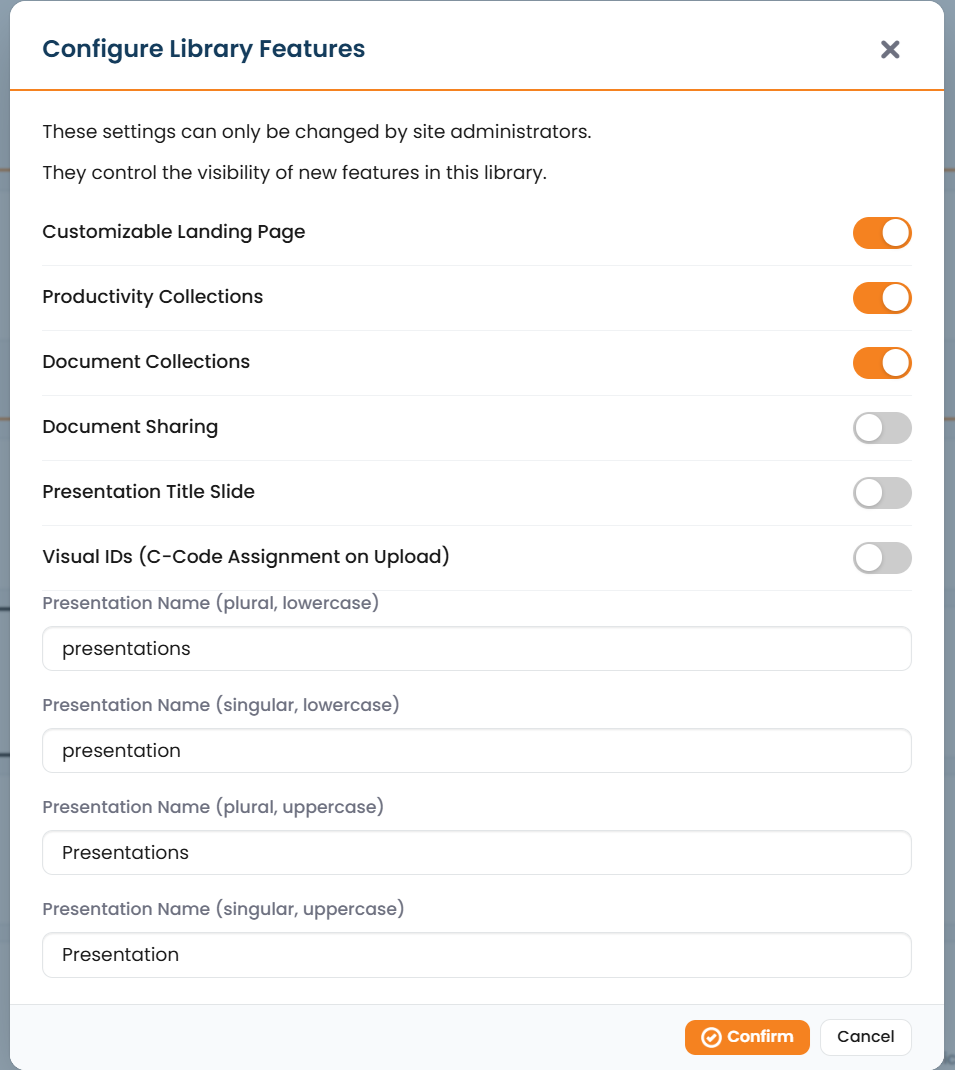
Feature toggles
Section titled “Feature toggles”Each toggle enables or disables a capability across the whole library.
| Feature | What it does when on |
|---|---|
| Customizable Landing Page | Enables the editable landing page (header, logo, disclaimer, widgets, sidebar). See Landing page & widgets. |
| Productivity Collections | Allows productivity collections: structured datasets defined by a schema, with Excel import/export. |
| Document Collections | Allows document collections for supporting files (publications, study reports, source materials). |
| Document Sharing | Allows documents to be shared. See Integrations. |
| Presentation Title Slide | Adds an automatic title slide to compiled presentations. |
Add-in and vCheck settings
Section titled “Add-in and vCheck settings”The Add-in Settings (PowerPoint add-in and vCheck stamping of downloaded decks) are configured from Manage Library as well. Because they affect downloaded files and the add-in experience, they’re documented with the other integrations.
Related
Section titled “Related”Landing page & widgetsHeader, logo, disclaimers, sidebar, and widgets.
IntegrationsAdd-in / vCheck, Veeva Vault, shared listing, document sharing, SIEM.
Set up your collectionsCreate collections: including productivity and document sets.
Manage LibraryThe admin dashboard and every setting it exposes.