Lifecycle & expiration
Approval says content has been reviewed. Lifecycle says how long that review stands. A lifecycle type gives content an expiration date, warns people before it arrives, and keeps a record of every review, refresh and archive along the way.
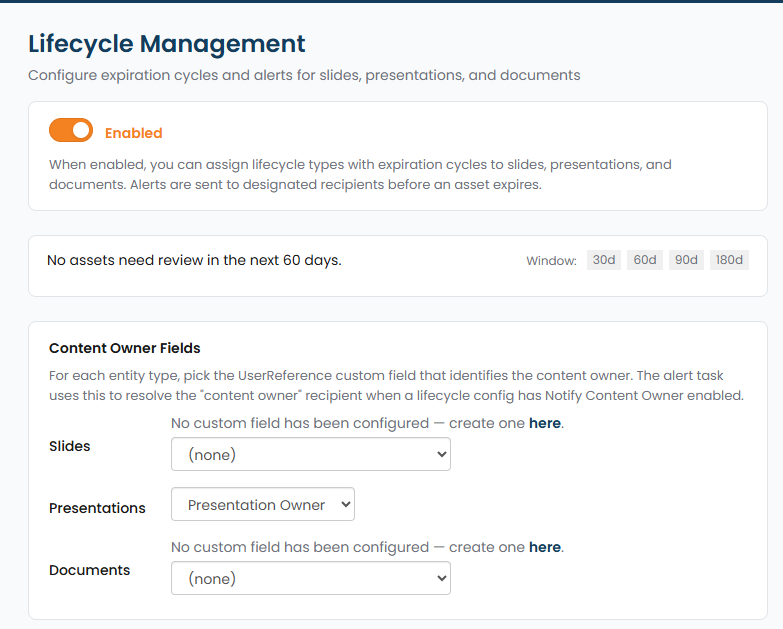
Set these up in Manage Library → Lifecycle Management. The pane carries a master switch for the whole feature, a rolling view of what falls due in the next 30, 60, 90 or 180 days, and the custom field that identifies the content owner for each kind of content, which is who a Notify Content Owner alert goes to.
Lifecycle types
Section titled “Lifecycle types”A lifecycle type is a named cycle you define once and assign to content. It carries:
| Setting | What it does |
|---|---|
| Name | What the cycle is called, for example Brief or Rapid Response. |
| Applies to | Which kind of content the type is for: slides, presentations or documents. |
| Expiration | How long content stays current, as a number and a unit. |
| Alert | How far ahead of expiration the first warning goes out. |
| Repeat alerts | Whether warnings continue after the first one. |
| Notify | Who hears about it. |
Two typical shapes: a Brief that expires after two years with a warning two months out, and a Rapid Response that expires after three months with a warning two weeks out.
Assigning a type
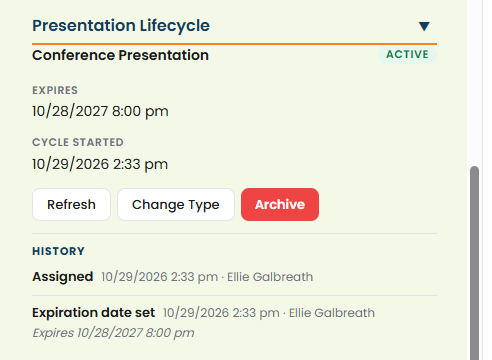
Section titled “Assigning a type”A lifecycle type is assigned to an individual piece of content from its properties, where a lifecycle section appears once types exist for that content kind. The section shows the type, when the current cycle started, when it expires, and the actions available.
Assigning a type computes the expiration date and schedules the alerts. Assigning a different type later replaces the cycle and cancels the alerts that were pending.
What happens when content is approved
Section titled “What happens when content is approved”Approving content that has a lifecycle type starts a new cycle. The expiration date is recomputed from the date of approval and the alerts are rescheduled.
This is the join between the two systems, and it is what makes reapproval meaningful: clearing content through review resets how long that clearance lasts.
Refresh and Archive
Section titled “Refresh and Archive”Two actions close out a cycle:
- Refresh starts a new cycle on content that is still good. Use it when a review concluded that nothing needs to change.
- Archive retires content at the end of its life.
Both take notes, and the notes are kept in the history. Write them for the person who will ask in a year why this was refreshed rather than revised.
Overriding the date
Section titled “Overriding the date”An expiration date can be set by hand when the computed one is wrong, for example when content was approved long before it was loaded. Overriding logs the change and reschedules the alerts from the new date.
Seeing what is coming
Section titled “Seeing what is coming”The library can report on what is expiring within a window, so you can see what needs review before it lapses rather than finding out from an alert. Use it as a standing check rather than waiting for individual emails.
The history
Section titled “The history”Each piece of content with a lifecycle keeps an event log. Entries cover being assigned a type, the expiration date being set or changed, an alert being sent, a review, a refresh, expiry, archiving, replacement, and a change to the underlying config. Every entry records who, when, any notes, and the expiration date as it stood.